How do I trim the historical price history in Money
Microsoft Money files get big over time, and part of that is the size of the history within Money
for stocks and fund investments.
Microsoft Money 2005 and 2006 have a facility to manage the investment
price history, so it doesn't get too large.
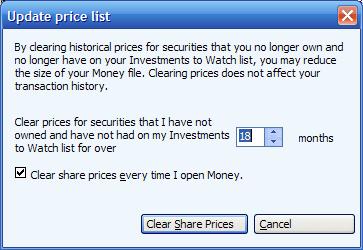
If you go to the portfolio manager, and select 'more->clear
historical prices', then you get a window which allows you to clear investment prices based on non-use. This doesn't
affect your transaction history, as the tool doesn't change any transactions (it is possible to have an empty price
list yet have a transaction history). There is also an option to run this every time you start Money, which should
remove the need for you to remember about it.