Including deposits in a report containing expense categories
Certain reports will give you information about your spending patterns. However, occasionally you may wish to track 'net' spending.
For example, if you receive a $10 refund for a purchase of $20, then instead of spending $20, you really have spent $10. The default 'spending by
category' report may still show that you have spent $20.
Some reports have an additional tab to allow you to select the types of transactions,
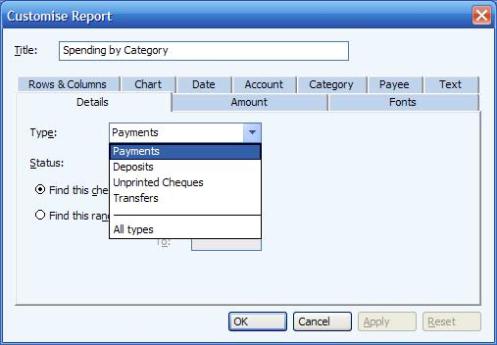
there could be 'payments' or 'deposits' for example. You may find that if you customize the report, click on the details tab, on the 'type' option,
'payments' is selected - this would cause the report to not include the example $10 above, as it is a deposit. To change the report to show you the
'net' payment, change this option to 'all types' instead.
See the image below: