Changing or merging category names in the Microsoft Money file
If you wish to alter, rename or reorganize the (sub) category names that you have used in existing transactions permanently, for example to rename 'Gas' to 'Gasoline' or similar, then you can do this in a couple of ways.
Firstly, if you are changing a single transaction to a new category, which currently exists, then the best way is to just change the category on the transaction using the form shown when you click on it in the account register. However, if there are a lot of transactions, then using Advanced Find and Replace would be a good solution to this.
If you just want to rename all transactions in a particular category, then go to the categories view and rename it - this is assuming you don't want to merge any transactions with another category. This also applies to subcategories.
If you want to delete a category, or merge one category with another, then you can go to the category view and delete the category there. When you do this, Microsoft Money will ask you where to move any existing transactions using that category - you can select a new category or create a new one. The picture below shows this - in the example, I am trying to delete the Healthcare:Dental subcategory.
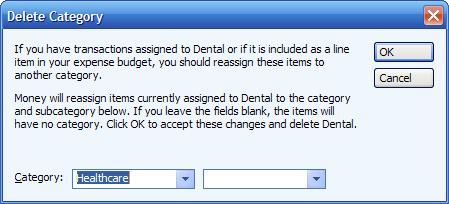
If you try to delete a category that includes subcategories, you will see an additional warning which says: "When you delete a category or classification class, all the subcategories or subclasses are also deleted. You may want to make sure you do not need the subcategories or subclasses before deleting them". Note that because you're deleting a category with subcategories, when you select the new category name,
all transactions using subcategories are merged to use just one new category.
To move transactions in a category to a subcategory, then the simplest way would be to ensure that category no longer has any subcategories (delete them first, and ensure everything is in the top level category), then use find/replace to change the category to the subcategory.
Beware though, if you delete a category that is included in custom reports, then you may need to delete them or edit them.
If you are wanting to change a category group, then see
Article 69.
Note: in this article, the word 'category' can also be read as 'subcategory'
Keywords: Merge, Subcategory, Rename, Category