Customizing the portfolio view to show more decimal places in prices
The default view of the portfolio in Microsoft Money, shows fund and stock prices to two
decimal places. However, some funds and stocks are quoted with a larger degree of granularity than this,
and may have up to four decimal places (this is especially prevelant in the United Kingdom for some pension
fund prices).
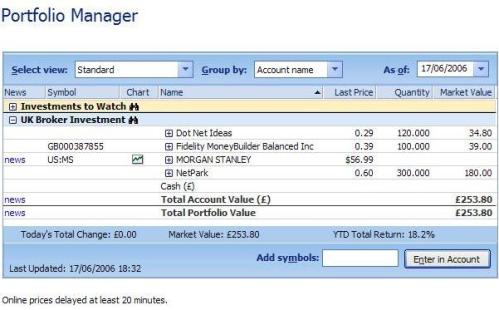
The display of two decimal places can be seen in the image below. Note that the
'Last Price' column which is currently showing the two decimal places.
When viewing the prices, the display will be rounded to the number of decimal places chosen.
However, if you want to view the full price (for example to four decimal places), then you will need to
customize the view of the portfolio to show it.
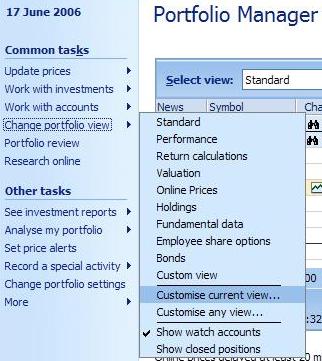
To customize the portfolio, click on 'Change
portfolio view', which is on the left hand side of the portfolio manager page, and select 'customize
current view...'.
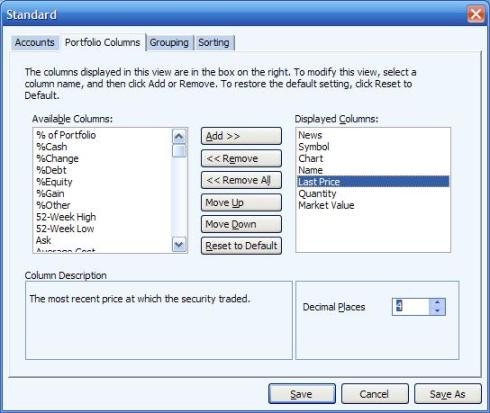
In the customization view, click on the tab named 'portfolio columns', and then in the
'displayed columns' box, select the column which you wish to customize. In this case, I have selected
the 'last price' column. Then, in the bottom right of the window, change the 'decimal places' box to
the required number of places, I have selected four below.
After you press save, and returning to the portfolio, you'll see four decimal places in
the current view.
Note that each portfolio view can be customized differently, so if you
want to see four in the 'standard' view and five in another one, you can do this.
Keywords: Decimal, Portfolio, Fund price, Stock price, Display