Installing the Money 2005 patch on Vista
If you install Money 2005 on Vista, the first time you run the program you'll be prompted with the
following message:
An update is available for your Money software. To install this update, you must be
logged on as a member of the Administrators group.
Log off Windows, and then log back on as a member of the
Administrators group. Restart this program to install the update. For more information, see Windows Help.
You'll find that by following these instructions, the update still doesn't work, and the program version remains at
14.0.120.730, which is the version without the required patch
(
Article 269).
The simple way to solve this problem is to start up Microsoft Money with adminstrator permissions (but not by
logging in as one). You can do this by finding the Microsoft Money entry in the Start Menu, then right click on it
and select the option 'Run as Administrator'.
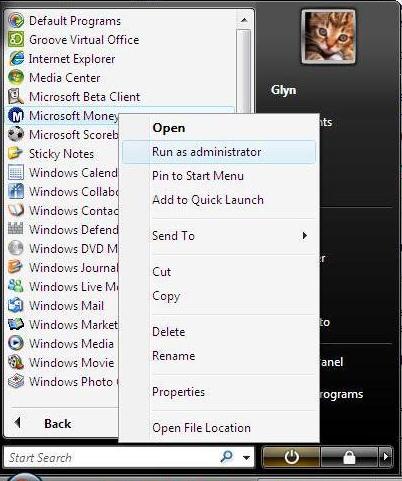
This should allow the software to update. Once updated, you can close down Money. When next using the software, you can run the program as normal, as the administrative permissions are no longer required.
If you're still having problems at this point, see
Article 204.
Keywords: Administrator, Vista, Patch