Problems accessing Newsgroup links in Vista
I had a report that there was a problem accessing links to newsgroups on this website, for example
like those in
Article 9
or
Article 6.
The specific problem manifested itself on a machine running Vista Ultimate and IE7. If you keep getting a popup error
clicking on any of the newsgroup links, it says "application not found".
What should happen under
Vista is that you get a pop up asking you whether you want to run Windows Mail (as seen below) or another
newsreader you have installed.
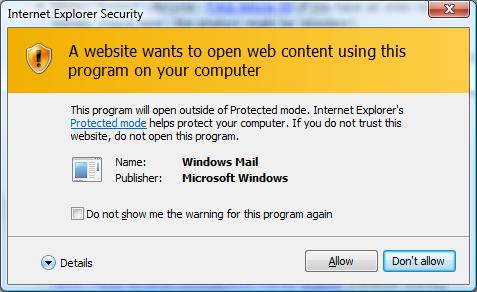
It’s possible that the newsreader is disabled (or blocked) or that a newsreader isn’t assigned to the
news: part of the URL.
To assign a newsreader (or restore it to default), open 'Control Panel' (it is an
option available after clicking the Vista 'Start' icon in the lower left of your screen). Choose the ‘programs’
option and then 'Default Programs'. If in 'Classic Mode', the the 'Default Programs' icon is displayed on the
control panel straightaway. Next choose the option ‘Default programs’.
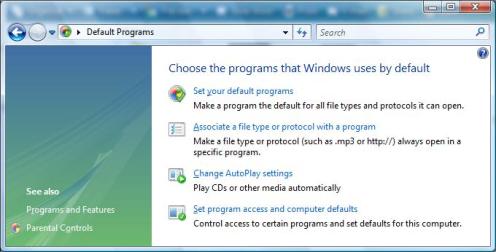
Click on ‘set your default programs’ and choose ‘Windows Mail (News)’ (if present) and click on ‘Set this program
as default’.
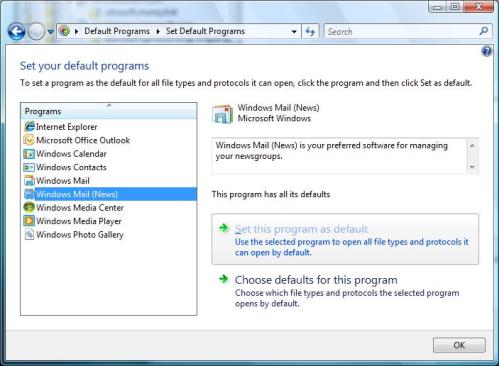
The next time you click on a news: link, such as the ones in
Article 9
or
Article 6,
then it should open (with or without the warning above). Then you will see the newsgroup (you could possibly be
asked to set up Windows Mail as it might be the first time you use it).
Keywords: Pop Up, Windows Mail, news, Newsgroup, Vista