Spending Insight
The spending insight is a few feature of Microsoft Money Plus, which allows you, from outside of the program
to view information on your spending patterns against your budget.
This feature requires you to set up a budget,
and also the spending tracker within the program first. Assuming you have a budget,
click on 'Budget' and then 'View Spending Tracker'. On the Spending Tracker page, click on 'select spending tracker
categories' on the left hand side and then choose those you wish to track. When complete press done.
What
you'll then see (and Money insights will update immediately), is information about your spending against the categories
in question. It will be displayed like that shown below when viewing the insight:
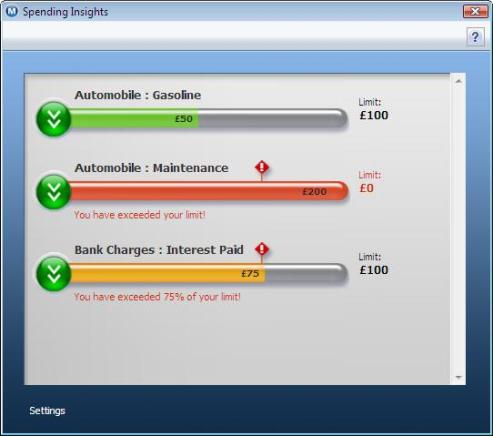
Note that there are three different types of bar:
- Green - you are unspending on that category
- Orange - you have spent more than 75% of the budget limit
- Red - you are overspent on the category
The big green button on the left hand side of the bar allows you to perform certain actions in Money, some in the context of the category chosen.
The options you can select here are:
- View transactions
- View and edit transactions in Money
- View and edit spending limits in Money
- Search for articles on MSN on how to save money on Category Name
- Share your ideas for saving money on Category Name
The last option goes to the MSN Money message boards.
All of the settings for this insight are managed within the Money file.
Keywords: Spending, Insights, Budget, Category