Bug in selecting shortcut key for Change Transaction Types
There is a bug in Money 2005 (which is also probably in other versions, however it is definitely
fixed in Money Plus) which manifests itself when downloading statements into your bank account.
When
you download statements and transactions, Money tries to match transactions downloaded against existing transactions.
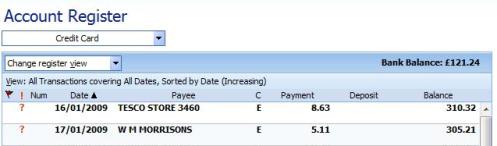
When you view your account register with these transactions, they are marked in
bold on the statement
view, as can be seen below:
Downloading statements adds two or three extra options to the context menu (invoked with a right
click). These are
Accept and
Change (additionally you can have
Unmatch for
manually matched items which haven't yet been accepted). These have shortcut keys of 'c' and 'g' respectively.
The context menu, if you are also viewing the transactions forms, can be seen below:
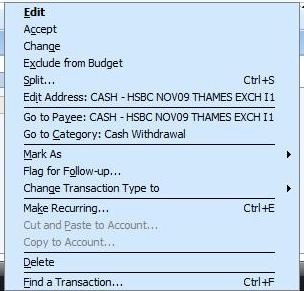
Note that the context menu has an option
Change Transaction Type to, which also has
a shortcut key of 'g'.
As there are two menu items with the same shortcut key, then pressing it
causes the first one to activate and not the second.
You cannot use another single keystroke to
activate the 'Change Transaction Type to' menu item, but you can use your cursor keys to navigate to that
part of the menu and show the three options underneath it. The three shortcuts for the options underneath
work.
Thanks to Chris Elias for the initial heads-up on this bug
Keywords: Match, Transaction, Menu, Shortcut