How to backup the Microsoft Money file
Backing up your Microsoft Money file is an essential part of managing your data. For many people,
the Money file is the most important file on their machine.
The simplest way to backup the file is to
simply copy it. Your Money file is the one with an extension of .MNY and typically lives in your 'My Documents'
folder (see
Article 324
for details on how to locate it).
At any point when you are running Microsoft Money, or when closing it
down, you can create a backup. Use the File>Backup option to create one before you do something you might need to
revert from (such as an archive, a large set of deletions, running file repairs etc.). This will create a backup
file with an extension of .MBF. (You can achieve the same effect by pasting
money://tool/backup into your browser).
You should also automate the
backup options to get Microsoft Money to create a backup when shutting down. This can be activated by pressing
Tools->Settings and selecting Backup Options.
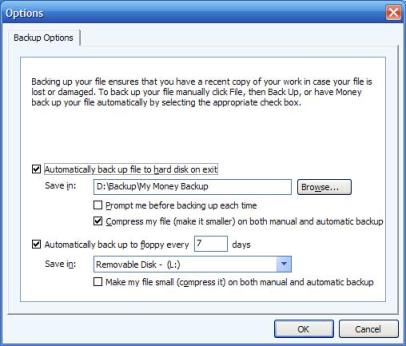
In this window, you can specify the location of the backup on shutdown, and also the location of a removable
storage backup. Using both options is recommended. Choose the 'compress my file' option if your disk space is
limited - this will extend the amount of time it takes to create your backup though (but helps if you subsequently backup to
an online storage facility, such as OneDrive or Google Drive. The window looks slightly
different in Microsoft Money 2006 - see
Article 212
for the Microsoft Money 2006 options.
More information on backups can be found in
Article 199.