Adding a new Currency in Microsoft Money 2005 and later
In Microsoft Money 2005, Microsoft changed the way that currencies were handled, and it not
longer was possible to create new custom currencies. They did, however, provide a greatly expanded list of
available currencies.
The latest versions of Money therefore can be quite restrictive if you want
to use a currency which is not on the built-in list. There is, however, a workaround which allows you to use
an existing currency to generate a new one.
If you go to the currencies page
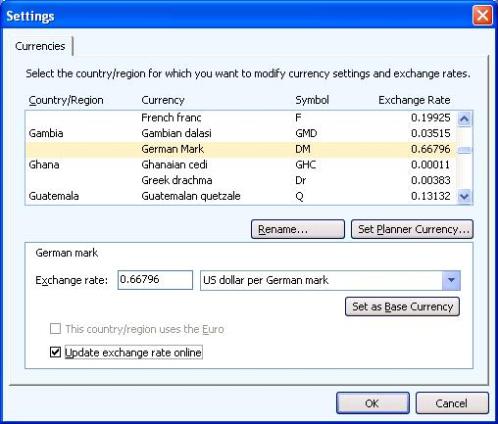
(tools->settings->program settings->Update currencies) you will see the currency list. Choose a currency
you won't use. In the example below, I have chosen the German Mark (DM) as the currency I wish to replace
with the one I need to add - the Guinea Franc (GNF). In the example, I am assuming I will never need to use
this currency again.
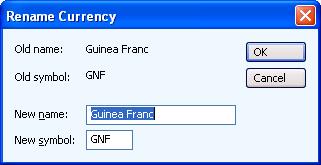
First, press the 'rename' button. This will bring up a small window which has two text boxes to allow you to
specify a new name and new symbol. You can put in the new values, e.g. 'Guinea Franc' and 'GNF'.
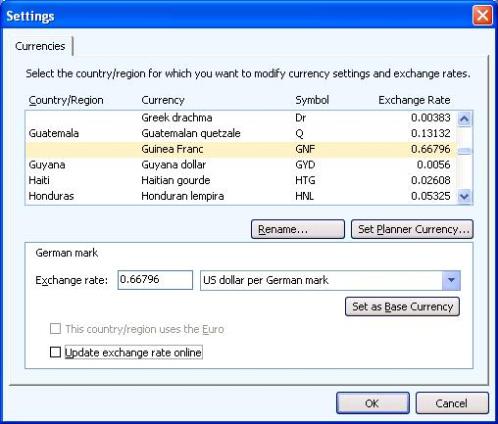
Returning to the currency list page, the new currency and symbol are listed. Note also that
the 'Update exchange rate online' checkbox is
deselected. You will also need to put in an exchange
rate for this new currency. Not everything though, will refer to the new names, but you should be able to
ignore this.
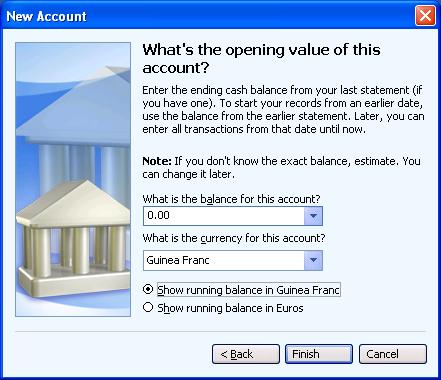
When using Microsoft Money, you can then specify the new currency when setting up
an account. (In the example below, ignore the 'Euro' line - because I chose an account which is now in the
Euro (
Article 282),
so it is listed.)
In the account list,
the exchange rate will be used to calculate the value of the account in your base currency (see
Article 337 for more information
on the base currency).
Keywords: Base, Currency, Exchange Rate, Custom