Money Insights Settings
The insights feature (
Article 523) in Microsoft Money Plus has a small number of options that can be configured. These allow you to choose which insights you want to use and see at startup, and for password settings.
The settings for the individual insights are found on the individual page for that insight (Bills Insight -
Article 511, Cash Flow Insight -
Article 505, Spending Insight -
Article 510), but general settings are shown below.
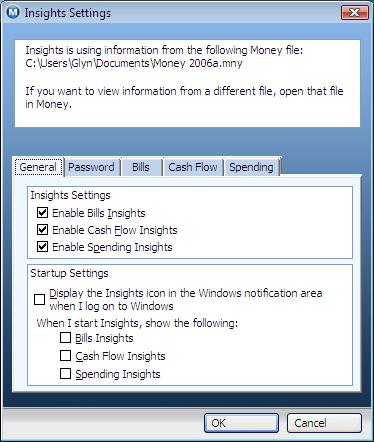
The settings page first will tell you the file which it is using information from in the top half of the window. This information is shown on all settings pages. If you need to use a different file, then you need to open that file in Money.
Under the 'general' tab, there are two sections - the first to enable individual insights, so you can select or deselect the ones you wish to see or not see.
The second, the 'Startup Settings' allows you to choose whether to display the icon in the notification area. In addition, you can select which insights are shown automatically when the insights program starts.
A second tab is titled 'Password'. If you use a password on your Money file, then Insights will prompt you for the password everytime it needs it. However, you can store the password to allow Insights to automatically use the file without prompt.
Keywords: Insights, Settings, Startup, Notification, Password